
Notice
Recent Posts
Recent Comments
Link
| 일 | 월 | 화 | 수 | 목 | 금 | 토 |
|---|---|---|---|---|---|---|
| 1 | 2 | 3 | 4 | |||
| 5 | 6 | 7 | 8 | 9 | 10 | 11 |
| 12 | 13 | 14 | 15 | 16 | 17 | 18 |
| 19 | 20 | 21 | 22 | 23 | 24 | 25 |
| 26 | 27 | 28 | 29 | 30 |
Tags
- crud
- 크롤링
- 모듈
- 이벤트 루프
- NoSQL
- 채팅 앱
- MONGOOSE
- 스코프
- Redis
- Firebase
- post
- 채팅앱
- 호이스팅
- JQuery
- 데이터 엔지니어
- react
- 공 피하기 게임
- MongoDB
- 크롬확장앱
- 수강관리앱
- socket.io
- npm
- HTTP
- Redux
- 빙고
- Get
- Websocket
- 클로저
- node.js
- 프로토타입패턴
Archives
- Today
- Total
개발로그
웹 게임 제작 : 공 피하기 본문
제이쿼리를 사용해 공을 피하는 웹 게임을 제작해 보자!

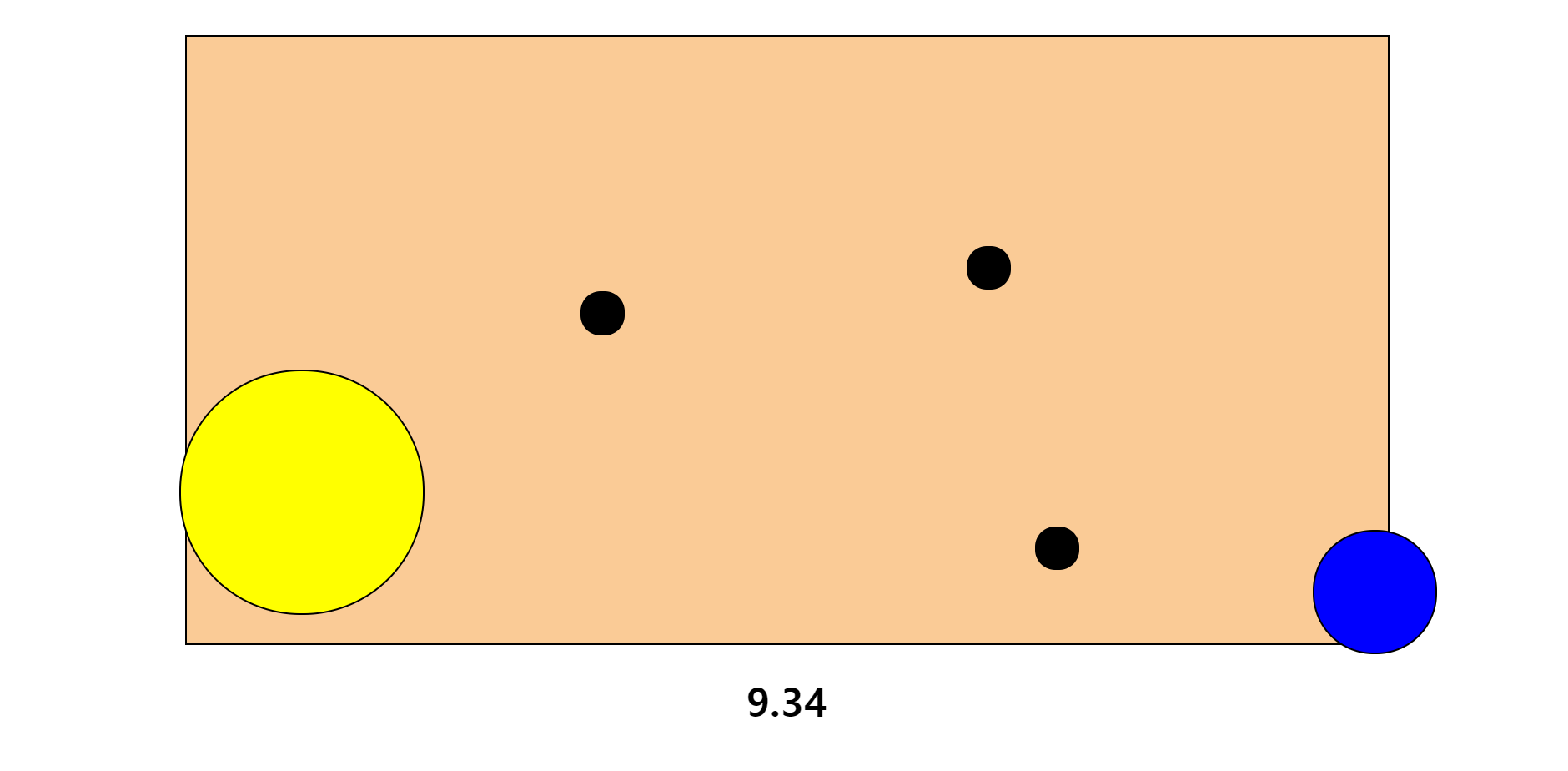
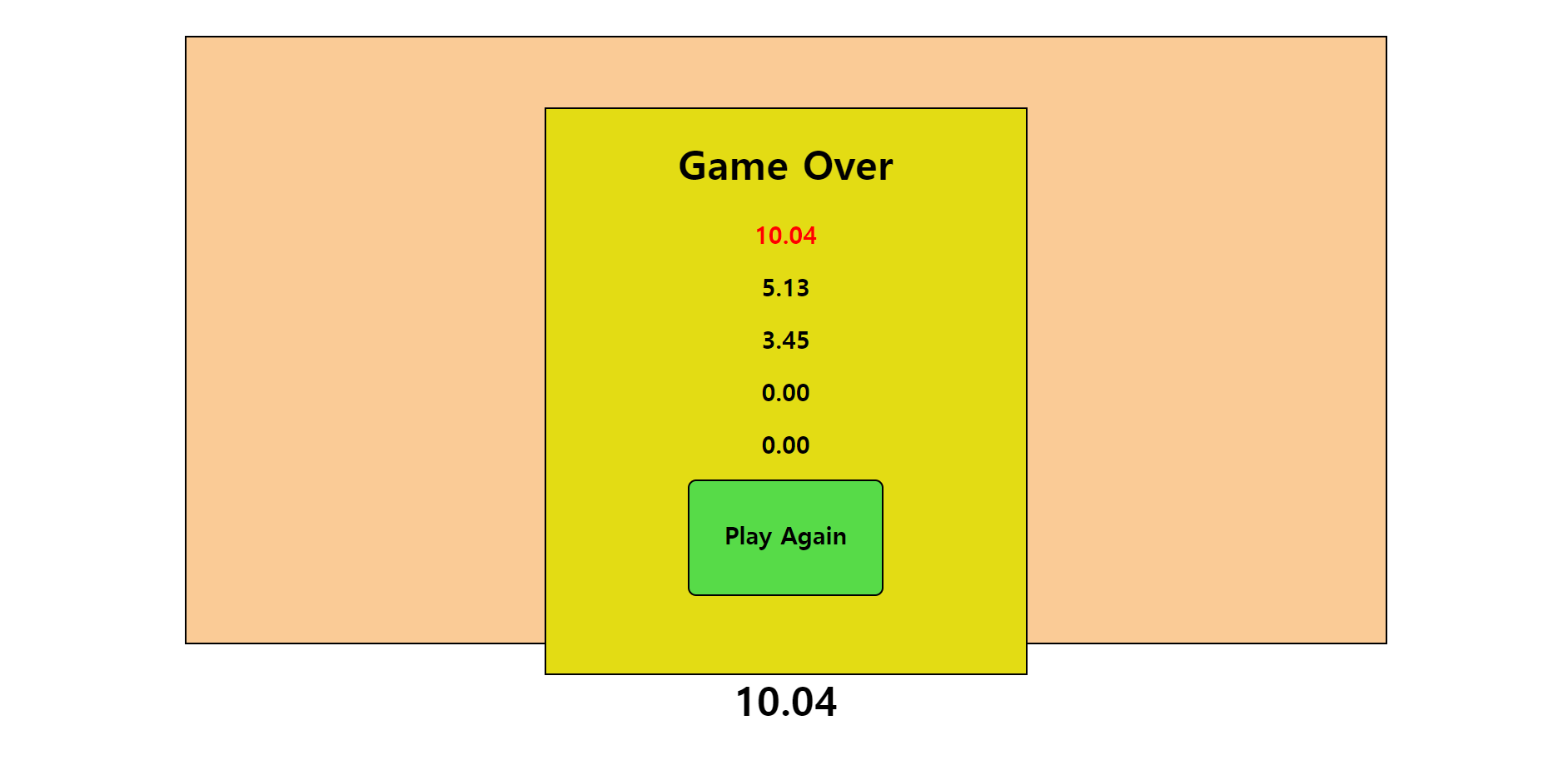
💡 게임 소개
마우스가 화면 밖으로 나가거나 공에 닿으면 게임이 끝난다. 게임 플레이 시간이 순위별로 기록된다.
💡 JQuery란?
JQuery는 자바스크립트를 이용한 HTML 조작을 더 편하게 하기 위해 만들어진 자바스크립트 라이브러리이다. JQuery를 설치하려면 명령어 등을 통해 직접 JQuery 라이브러리를 다운로드하거나, CDN을 이용하여 웹 네트워크 상으로 JQuery 라이브러리를 받아오면 된다.
JQuery 문법은 대부분 $ 기호로 표현된다. 주로 아래와 같은 형식으로 사용한다.
$(Selector).JQueryAPI();
💡 HTML 코드
<!DOCTYPE html>
<html>
	<head>
		<title>공피하기 게임</title>
		<script type = "text/javascript" src = "https://code.jquery.com/jquery-latest.min.js"></script>
		<link rel = "stylesheet" type = "text/css" href = "style.css" />
	</head>
	<body>
		<div class = "space"></div>
		<div class = "screen">
			<div class = "startbutton">
				<h1>
					<div class = "center">공피하기 게임</div>
				</h1>
				<h3>
					<div class = "center">클릭하면 시작</div>
				</h3>
			</div>
		</div>
		<div class = "timer">
			<h1>
				<div class = "center">0.00</div>
			</h1>
		</div>
		<div id = "highscores">
			<h1>
				<div class = "center">Game Over</div>
			</h1>
		</div>
		<script type = "text/javascript" src = "game.js"></script>
	</body>
</html>
💡 CSS 코드
body {
	height : 100%;
	width : 100%;
}
.space {
	height : 100vh;
	width : 100vw;
	border : 1px black solid;
	margin : auto;
	position : relative;
	z-index : 1;
}
.screen {
	background-color : #facb96;
	height : 75vh;
	width : 75vw;
	border : 2px black solid;
	margin : auto;
	margin-top : -95vh;
	position : relative;
	z-index : 2;
}
.startbutton {
	padding : 2vh;
	background-color : #57db48;
	height : 50vh;
	width : 30vw;
	border : 2px black solid;
	border-radius : 10px;
	margin : auto;
	margin-top : 10vh;
	position : relative;
	z-index : 3;
}
.center {
	text-align : center;
}
h1 {
	z-index : 1;
	font-size : 5vmin;
}
h2 {
	z-index : 1;
	font-size : 3vmin;
}
.circle {
	position : absolute;
	z-index : 3;
	border : 2px black solid;
}
.redcircle {
	position : absolute;
	z-index : 3;
	border : 2px black solid;
}
#highscores {
	background-color : #e3dc14;
	height : 70vh;
	width : 30vw;
	margin : auto;
	margin-top : -80vh;
	position : relative;
	z-index : 9;
	display : none;
	border : 2px black solid;
}
.resetButton {
	padding : 2vh;
	background-color : #57db48;
	height : 10vh;
	width : 10vw;
	border : 2px black solid;
	border-radius : 10px;
	margin : auto;
	margin-top : 0px;
	position : relative;
	z-index : 10;
}
.timer {
	margin-top : 0px;
	position : relative;
	z-index : 10;
}
💡 Javascript 코드
$(document).ready(function(){

	//공의 개수
	var circleNumber = 0;

	// 색 / 크기(지름) / 크기(반지름) / 속도
	var circleTypes = {
		//speed는 속도가 아니고, 한 지점에서 다른 지점으로 움직일 때 걸리는 ms
		"option" : ["color", "width", "border-radius", "speed"],
		"small" : ["black", 5, 2.5, 3000],
		"medium" : ["blue", 15, 7.5, 4000],
		"large" : ["yellow", 30, 15, 5000]
	};

	// 시간을 찍어주는 변수
	var t = 0;

	// 게임 실행 여부
	var gameOn = false;

	// 마우스 좌표
	var mouseX;
	var mouseY;

	// 마우스 움직임을 감지해서 마우스 좌표를 좌표 변수에 담는 함수
	$("body").mousemove(function(){
		mouseX = event.pageX;
		mouseY = event.pageY;
	});

	// 타이머
	function timer() {
		if(gameOn == true) {
			setTimeout(function() {
				t = t + 0.01;
				$(".timer").html(`<h1><div class = "center">${t.toFixed(2)}</div></h1>`);
				timer();
			}, 10)
		}
	}

	// 시작 기능
	$(".startbutton").click(function(){
    	// .fadeToggle():보이는 요소는 보이지 않게, 보이지 않는 요소는 보이게 하는 메소드
		$(".startbutton").fadeToggle(500, function() {
			gameOn = true;
			timer();
			$(".space").mouseenter(function(){
				// 게임을 끝내는 함수
				endgame();
			});
			createCircle();
		});
	});

	// createCircle 함수

	// animateCircle 함수

	// endgame 함수

	var resetButton = "<div class='resetButton center'><h2>Play Again</h2></div>";
	var highScore1 = 0.00;
	var highScore2 = 0.00;
	var highScore3 = 0.00;
	var highScore4 = 0.00;
	var highScore5 = 0.00;

	// updateScores 함수
});
createCircle 함수
function createCircle() {
	circleNumber++;

	// 1, 2, 3 중 하나
	var randomOneThree = Math.floor(3 * Math.random()) + 1;

	if(randomOneThree == 1) {
		var circleChoice = "small";
	} else if(randomOneThree == 2) {
		var circleChoice = "medium";
	} else {
		var circleChoice = "large";
	}

	// 공의 id
	var circleName = "circle" + circleNumber;

	var circleColor = circleTypes[circleChoice][0];
	var circleSize = circleTypes[circleChoice][1];
	var circleRadius = circleTypes[circleChoice][2];
	var circleSpeed = circleTypes[circleChoice][3];

	// 공이 움직이는 범위
	var moveableWidth = $("body").width() - circleSize;
	var moveableHeight = $("body").height() - circleSize;

	// 공의 초기 시작 좌표
	var circlePositionLeft = (moveableWidth * Math.random()).toFixed();
	var circlePositionTop = (moveableHeight * Math.random()).toFixed();

	var newCircle = `<div class = 'circle' id = "${circleName}"></div>`;
	$("body").append(newCircle);

	$("#"+circleName).css({
		"background-color" : circleColor,
		"width" : circleSize + "vmin",
		"height" : circleSize + "vmin",
		"border-radius" : circleRadius + "vmin",
		"top" : circlePositionTop + "px",
		"left" : circlePositionLeft + "px"
	});

	// 1ms마다 마우스와의 거리를 계산하는 함수
	function timeCirclePosition(circleTrackId){
		setTimeout(function(){
			var currentCirclePosition = $(circleTrackId).position();
			var calculateRadius = parseInt($(circleTrackId).css("width")) * 0.5;

			var distanceX = mouseX - (currentCirclePosition.left + calculateRadius);
			var distanceY = mouseY - (currentCirclePosition.top + calculateRadius);

			if(Math.sqrt(Math.pow(distanceX, 2) + Math.pow(distanceY, 2)) <= calculateRadius){
				//부딪힌 공 빨간색으로 표시
				$(circleTrackId).removeClass('circle').addClass('redcircle');
				$(circleTrackId).css("background-color", "red");

				console.log("게임 끝");
				endgame();
			};
			timeCirclePosition(circleTrackId);
		}, 1);
	}
	timeCirclePosition('#'+circleName);

	animateCircle(circleName, circleSpeed, circleSize);

	// 3초에 한 번 공 랜덤 생성
	setTimeout(function(){
		if(gameOn == true) {
			createCircle();
		}
	}, 3000);
};
animateCircle 함수
function animateCircle(circleId, speed, circleSize) {
	// animate() 위치를 이동시키는 함수
	var moveableWidth = $("body").width() - circleSize;
	var moveableHeight = $("body").height() - circleSize;
	var circleMoveLeft = (moveableWidth * Math.random()).toFixed();
	var circleMoveTop = (moveableHeight * Math.random()).toFixed();

	$("#" + circleId).animate({
		left : circleMoveLeft,
		top : circleMoveTop
	}, speed, function(){
		animateCircle(circleId, speed, circleSize);
	});
};
endgame 함수
function endgame(){
	if(gameOn == true) {
		gameOn = false;
		updateScores(t);
		$(".circle").remove();
		$(".redcircle").stop();
	};
};
updateScores 함수
function updateScores(newScore){
	newScore += 0.01;

	if(newScore > highScore1){
		var redScore = "score1";
		highScore5 = highScore4;
		highScore4 = highScore3;
		highScore3 = highScore2;
		highScore2 = highScore1;
		highScore1 = newScore;
	}

	else if(newScore > highScore2){
		var redScore = "score2";
		highScore5 = highScore4;
		highScore4 = highScore3;
		highScore3 = highScore2;
		highScore2 = newScore;
	}

	else if(newScore > highScore3){
		var redScore = "score3";
		highScore5 = highScore4;
		highScore4 = highScore3;
		highScore3 = newScore;
	}

	else if(newScore > highScore4){
		var redScore = "score4";
		highScore5 = highScore4;
		highScore4 = newScore;
	}

	else if(newScore > highScore5){
		var redScore = "score5";
		highScore5 = newScore;
	}

	var highScorePlace1 = "<div class='score center' id='score1'><h2>" + highScore1.toFixed(2) + "</h2></div>";
	var highScorePlace2 = "<div class='score center' id='score2'><h2>" + highScore2.toFixed(2) + "</h2></div>";
	var highScorePlace3 = "<div class='score center' id='score3'><h2>" + highScore3.toFixed(2) + "</h2></div>";
	var highScorePlace4 = "<div class='score center' id='score4'><h2>" + highScore4.toFixed(2) + "</h2></div>";
	var highScorePlace5 = "<div class='score center' id='score5'><h2>" + highScore5.toFixed(2) + "</h2></div>";

	$("#highscores").append(highScorePlace1, highScorePlace2, highScorePlace3, highScorePlace4, highScorePlace5, resetButton);
	$("#"+redScore).css("color", "red");
	$("#highscores").toggle();

	$(".resetButton").click(function(){
		gameReset();
	});

	function gameReset(){
		$("#highscores").fadeToggle(100, function(){
			t = 0;
			$(".timer").html(`<h1><div class="center">${t.toFixed(2)}</div></h1>`);
			$(".resetButton").remove();
			$(".score").remove();
			$(".startbutton").toggle();
			$(".redcircle").remove();
		});
	};
};'IT' 카테고리의 다른 글
| socket.io를 이용한 채팅 앱 구현 (0) | 2023.10.09 |
|---|---|
| Node.js에 대해 알아보자! (0) | 2023.09.30 |
| 객체지향 자바스크립트 (0) | 2023.09.29 |
| JavaScript 크롤링 : 뉴스 (0) | 2023.09.19 |
| 프레임워크 없이 CRUD 구현하기 (0) | 2023.09.12 |
'IT' Related Articles
more


