
| 일 | 월 | 화 | 수 | 목 | 금 | 토 |
|---|---|---|---|---|---|---|
| 1 | 2 | 3 | 4 | |||
| 5 | 6 | 7 | 8 | 9 | 10 | 11 |
| 12 | 13 | 14 | 15 | 16 | 17 | 18 |
| 19 | 20 | 21 | 22 | 23 | 24 | 25 |
| 26 | 27 | 28 | 29 | 30 |
- 공 피하기 게임
- crud
- 이벤트 루프
- socket.io
- 프로토타입패턴
- post
- 수강관리앱
- node.js
- Redux
- 채팅앱
- 크롬확장앱
- Websocket
- 클로저
- 크롤링
- NoSQL
- npm
- MongoDB
- Firebase
- 스코프
- 데이터 엔지니어
- Redis
- 호이스팅
- 채팅 앱
- HTTP
- 빙고
- Get
- react
- JQuery
- 모듈
- MONGOOSE
- Today
- Total
개발로그
프레임워크 없이 CRUD 구현하기 본문
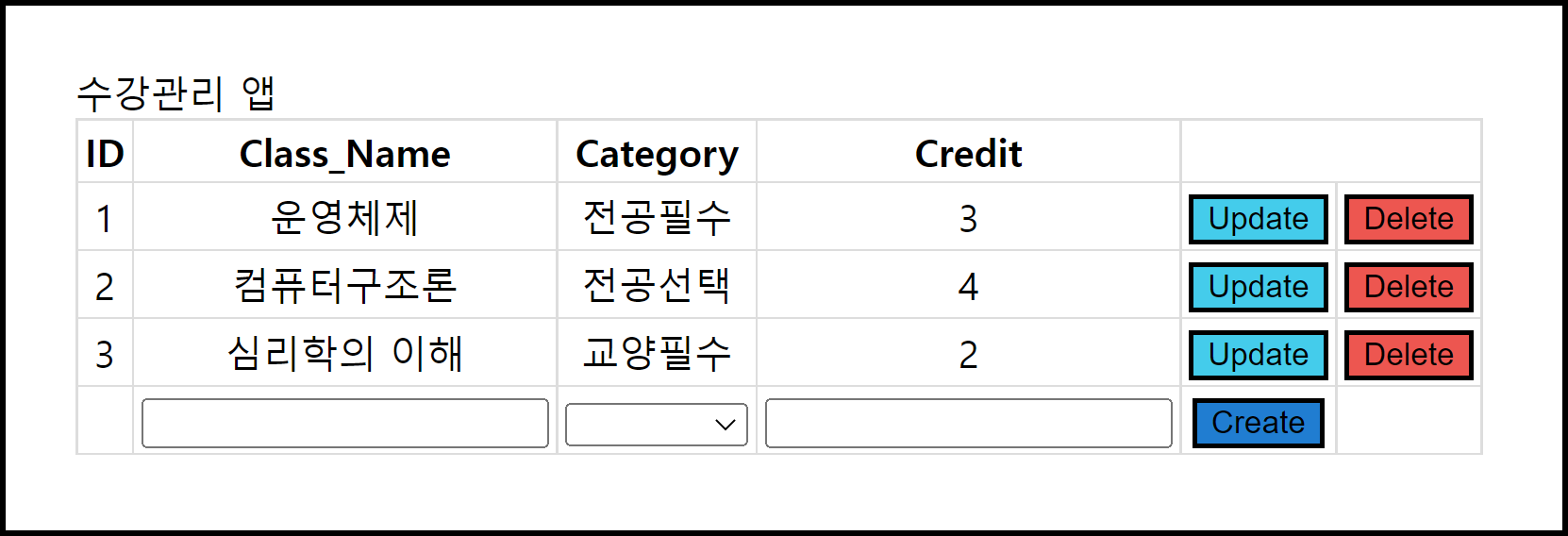
CRUD가 구현된 수강관리 앱을 만들어보자!
⚡ CRUD란?
CRUD는 대부분의 컴퓨터 소프트웨어가 가지는 기본적인 데이터 처리 기능인 Create(생성), Read(읽기), Update(갱신), Delete(삭제)를 묶어서 일컫는 말이다.
⚡ HTML 코드
<!DOCTYPE html>
<html>
	<head>
		<title>수강관리 앱</title>
		<link rel = "stylesheet" href = "style.css">
	</head>
	<body>
		<div id = "container"></div>
	</body>
	<script src = "./script.js"></script>
</html>
⚡ CSS 코드
.title {
	font-weight : bold;
	font-size : 30px;
}

table, th, td {
	border : solid 1px #DDD;
	border-collapse : collapse;
	padding : 2px 3px;
	text-align : center;
}
⚡ Javascript 코드
가독성을 위해 CreateNew, Save, Update, Delete 메소드를 따로 나누어 작성하였다. 코드가 길어서 설명은 주석으로 넣었다.
var crudApp = new function() {
	this.myClass = [
		{ID : '1', Class_Name : '운영체제', Category : '전공필수', Credit : 3},
		{ID : '2', Class_Name : '컴퓨터구조론', Category : '전공선택', Credit : 4},
		{ID : '3', Class_Name : '심리학의 이해', Category : '교양필수', Credit : 2},
	];
	this.Category = ['전공필수', '전공선택', '교양필수', '교양선택'];

    // 확장성을 위해 th에 담길 데이터를 col 배열에 담는다
	this.col = [];

	this.createTable = () => {
		for(var i = 0; i < this.myClass.length; i++){
			for(var key in this.myClass[i]){
				if(this.col.indexOf(key) === -1) this.col.push(key);
			}
		}

		var table = document.createElement('table');
		table.setAttribute('id', 'classTable');

		var tr = table.insertRow(-1);

		// th 작성
		for(var h = 0; h < this.col.length; h++) {
			var th = document.createElement('th');
			th.innerHTML = this.col[h];
			tr.appendChild(th);
		}

		// td 작성
		for(var i = 0; i < this.myClass.length; i++) {
			tr = table.insertRow(-1);
			for(var j = 0; j < this.col.length; j++) {
				var tabCell = tr.insertCell(-1);
				tabCell.innerHTML = this.myClass[i][this.col[j]];
			}

			// update 버튼 만들기
			this.td = document.createElement('td');
			tr.appendChild(this.td);
			var btUpdate = document.createElement('input');
			btUpdate.setAttribute('type', 'button');
			btUpdate.setAttribute('value', 'Update');
			btUpdate.setAttribute('id', 'Edit' + i);
			btUpdate.setAttribute('style', 'background-color : #44CCEB;');
			btUpdate.setAttribute('onclick', 'crudApp.Update(this)');
			this.td.appendChild(btUpdate);

			// save 버튼 만들기
			tr.appendChild(this.td);
			var btSave = document.createElement('input');
			btSave.setAttribute('type', 'button');
			btSave.setAttribute('value', 'Save');
			btSave.setAttribute('id', 'Save' + i);
			btSave.setAttribute('style', 'display : none;');
			btSave.setAttribute('onclick', 'crudApp.Save(this)');
			this.td.appendChild(btSave);

			// delete 버튼 만들기
			this.td = document.createElement('td');
			tr.appendChild(this.td);
			var btDelete = document.createElement('input');
			btDelete.setAttribute('type', 'button');
			btDelete.setAttribute('value', 'Delete');
			btDelete.setAttribute('id', 'Delete' + i);
			btDelete.setAttribute('style', 'background-color : #ED5650;');
			btDelete.setAttribute('onclick', 'crudApp.Delete(this)');
			this.td.appendChild(btDelete);
		}

		// 입력 행 추가
		tr = table.insertRow(-1);
		for(var j = 0; j < this.col.length; j++) {
			var newCell = tr.insertCell(-1);
            // ID 값(j = 0일 때)은 입력받지 않는다
			if(j >= 1) {
				if(j == 2) {
					var select = document.createElement('select');
					select.innerHTML = `<option value = ""></option>`;
					for(var k = 0; k < this.Category.length; k++) {
						select.innerHTML +=
							`<option value = "${this.Category[k]}">${this.Category[k]}</option>`;
					}
					newCell.appendChild(select);
				}
				else {
					var tBox = document.createElement('input');
					tBox.setAttribute('type', 'text');
					tBox.setAttribute('value', '');
					newCell.appendChild(tBox);
				}
			}
		}

		// create 버튼 만들기
		this.td = document.createElement('td');
		tr.appendChild(this.td);
		var btCreate = document.createElement('input');
		btCreate.setAttribute('type', 'button');
		btCreate.setAttribute('value', 'Create');
		btCreate.setAttribute('id', 'New' + i);
		btCreate.setAttribute('style', 'background-color : #207DD1;');
		btCreate.setAttribute('onclick', 'crudApp.CreateNew(this)');
		this.td.appendChild(btCreate);

		var div = document.getElementById('container');
		div.innerHTML = '수강관리 앱';
		div.appendChild(table);
	}

	// Delete 메소드 코드

	// CreateNew 메소드 코드

	// Update 메소드 코드

	// Save 메소드 코드
}

crudApp.createTable();
Delete 메소드 코드
this.Delete = (oButton) => {
	var targetIdx = oButton.parentNode.parentNode.rowIndex;
	this.myClass.splice((targetIdx - 1), 1);
	this.createTable();
}
Delete 버튼을 누르면 실행된다. oButton의 상위 노드는 td이고, td의 상위 노드는 tr이다. 때문에 targetIdx에 버튼을 누른 행의 인덱스 값이 저장되고, myClass에서 해당 행을 제거한다.
CreateNew 메소드 코드
this.CreateNew = (oButton) => {
	var writtenIdx = oButton.parentNode.parentNode.rowIndex;
	var trData = document.getElementById('classTable').rows[writtenIdx];

	var obj = {};

	// tr 데이터에서 td 속의 key:value 뽑아서 obj 안에 저장
	for(var i = 1; i < this.col.length; i++) {
		var td = trData.getElementsByTagName("td")[i];
		if(td.childNodes[0].getAttribute('type') === 'text' || td.childNodes[0].tagName === 'SELECT') {
			var txtVal = td.childNodes[0].value;

			if(txtVal != '') {
				obj[this.col[i]] = txtVal;
			}
			else {
				obj = '';
				alert("all fields are compulsory");
				break;
			}
		}
	}

	// Credit에 숫자 자료형이 입력되지 않으면 에러 출력
	if(obj != '') {
		if(isNaN(obj['Credit']) !== false) {
			obj = '';
			alert("Please enter number data type for Credit!");
		}
	}

	obj[this.col[0]] = this.myClass.length + 1; // 자동으로 ID 값 부여
	this.myClass.push(obj);
	this.createTable();
}
Create 버튼을 누르면 실행된다. writtenIdx에 버튼을 누른 행(마지막 행)의 인덱스 값이 저장되고, trData에 해당 행의 데이터들이 저장된다. 비어 있는 데이터가 존재하면 obj를 초기화시킨 후 에러를 출력한다. 모든 데이터가 입력되었다면 obj를 myClass에 추가한다. Credit에 숫자 자료형이 입력되지 않으면 에러를 출력하는 기능을 추가로 구현했다.
Update 메소드 코드
this.Update = (oButton) => {
	var writtenIdx = oButton.parentNode.parentNode.rowIndex;
	var trData = document.getElementById('classTable').rows[writtenIdx];

	for(var i = 1; i < this.col.length; i++) {
		if(i === 2) {
			var td = trData.getElementsByTagName("td")[i];
			var select = document.createElement("select");
			select.innerHTML = `<option value = "${td.innerText}">${td.innerText}</option>`;
			for(var k = 0; k < this.Category.length; k++) {
				select.innerHTML +=
					`<option value = "${this.Category[k]}">${this.Category[k]}</option>`;
			}
			td.innerText = '';
			td.appendChild(select);
		}
		else {
			var td = trData.getElementsByTagName("td")[i];
			var input = document.createElement("input");
			input.setAttribute("type", "text");
			input.setAttribute("value", td.innerText);
			td.innerText = '';
			td.appendChild(input);
		}
	}

	var btSave = document.getElementById('Save' + (writtenIdx - 1));
	btSave.setAttribute('style', 'display : block; background-color : #2DBF64;');
	oButton.setAttribute('style', 'display : none;');
}
Update 버튼을 누르면 실행된다. input 태그와 select 태그를 활성화시킨다. Update 버튼 대신 Save 버튼을 화면에 띄운다.
Save 메소드 코드
this.Save = (oButton) => {
	var writtenIdx = oButton.parentNode.parentNode.rowIndex;
	var trData = document.getElementById('classTable').rows[writtenIdx];

	for(var i = 1; i < this.col.length; i++) {
		var td = trData.getElementsByTagName("td")[i];
		if(td.childNodes[0].getAttribute('type') === 'text' || td.childNodes[0].tagName === 'SELECT') {
			this.myClass[writtenIdx-1][this.col[i]] = td.childNodes[0].value;
		}
	}
	this.createTable();
}
Save 버튼을 누르면 실행된다. myClass에 저장되어 있던 기존의 값들을 새로 수정된 값들로 변경한다.
'IT' 카테고리의 다른 글
| socket.io를 이용한 채팅 앱 구현 (0) | 2023.10.09 |
|---|---|
| Node.js에 대해 알아보자! (0) | 2023.09.30 |
| 객체지향 자바스크립트 (0) | 2023.09.29 |
| JavaScript 크롤링 : 뉴스 (0) | 2023.09.19 |
| 웹 게임 제작 : 공 피하기 (0) | 2023.09.17 |


